On this page

Multi-cluster Configuration Management for Edge, Multi-Cloud, and Hybrid Cloud





KubeStellar is a Cloud Native Computing Foundation (CNCF) Sandbox project that simplifies the deployment and configuration of applications across multiple Kubernetes clusters. It provides a seamless experience akin to using a single cluster, and it integrates with the tools you’re already familiar with, eliminating the need to modify existing resources.
KubeStellar is particularly beneficial if you’re currently deploying in a single cluster and are looking to expand to multiple clusters, or if you’re already using multiple clusters and are seeking a more streamlined developer experience.
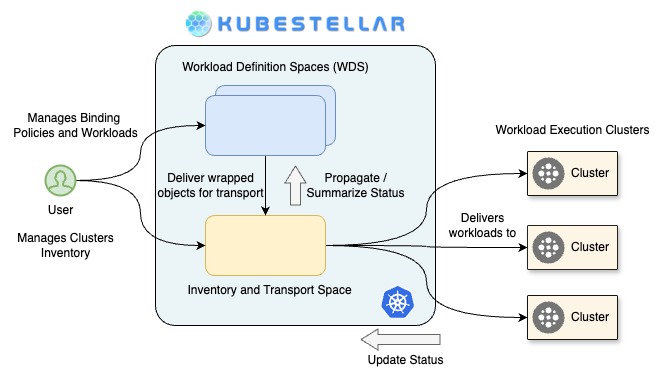
The use of multiple clusters offers several advantages, including:
- Separation of environments (e.g., development, testing, staging)
- Isolation of groups, teams, or departments
- Compliance with enterprise security or data governance requirements
- Enhanced resiliency, including across different clouds
- Improved resource availability
- Access to heterogeneous resources
- Capability to run applications on the edge, including in disconnected environments
In a single-cluster setup, developers typically access the cluster and deploy Kubernetes objects directly. Without KubeStellar, multiple clusters are usually deployed and configured individually, which can be time-consuming and complex.
KubeStellar simplifies this process by allowing developers to define a binding policy between clusters and Kubernetes objects. It then uses your regular single-cluster tooling to deploy and configure each cluster based on these binding policies, making multi-cluster operations as straightforward as managing a single cluster. This approach enhances productivity and efficiency, making KubeStellar a valuable tool in a multi-cluster Kubernetes environment.
Getting Started
See the Getting Started setup guide for getting started with kicking the tires.
Contributing
We ❤️ our contributors! If you’re interested in helping us out, please head over to our Contributing guide.
Getting in touch
There are several ways to communicate with us:
Instantly get access to our documents and meeting invites http://kubestellar.io/joinus
- The
#kubestellar-devchannel in the CNCF Slack workspace - Our mailing lists:
- kubestellar-dev for development discussions
- kubestellar-users for discussions among users and potential users
- Subscribe to the community calendar for community meetings and events
- The kubestellar-dev mailing list is subscribed to this calendar
- See recordings of past KubeStellar community meetings on YouTube
- See upcoming and past community meeting agendas and notes
- Browse the shared Google Drive to share design docs, notes, etc.
- Members of the kubestellar-dev mailing list can view this drive
- Read our documentation
- Follow us on:
- LinkedIn - #kubestellar
- Medium - kubestellar.medium.com
Release Notes
For detailed, summaries of each release—including new features, bug fixes, and breaking changes—please visit our release notes page:
https://docs.kubestellar.io/unreleased-development/direct/release-notes/
❤️ Contributors
Thanks go to these wonderful people: